Why This Post Is Different
Most posts here document a project from start to finish in one sitting. This one spans years. It starts as a failed Sem 5 mini-project on a Numato Spartan-6 board and ends — finally — on a Digilent Arty A7 with Vivado, years later, with the result actually showing on an LCD screen.
I am writing this not because the final result is technically impressive (it isn’t — the values are hardcoded), but because the story behind it is worth telling. Sometimes a small, unfinished project sits in the back of your mind for years. This is what it looks like when you finally go back and close it.
Part 1 — The Original Project (Sem 5, Numato Spartan-6)
The assignment was simple on paper: implement an 8-bit ALU on FPGA — AND, OR, XOR, and other operations — simulate it, then display the result on LEDs in binary (LED on = 1, LED off = 0).
Several things worked against this from day one.
Tooling problems:
- Xilinx ISE — the tool required for the Numato Spartan-6 board — had no driver support for Windows 11. Every laptop in the group ran Windows 11. The only place we could actually program the board was on a specific Linux lab machine at college, and even there, we could only simulate — there was no proper hands-on programming setup for most of the semester.
Team problems:
- I was the only one in the group who was actually interested in the project. Everything — research, code, debugging — fell on me.
Mentorship problems:
- A visiting faculty member came in once a week, for one hour, on Fridays. That was the entire teaching bandwidth for FPGA that semester. Not nearly enough time to build real understanding from scratch.
After I got the ALU simulation working, the visiting faculty decided the original LED-based output was “too easy” and told me to switch to an LCD display showing decimal results instead — directly, before even getting the LED version working on real hardware.
This decision cost the project.
I did not have the full picture of how to interface an LCD with an FPGA at that point. This was before AI tools were mainstream — I was relying entirely on scattered YouTube tutorials and whatever documentation I could find. Getting an LCD talking to an FPGA from a standing start, with one hour of guidance per week, ate weeks of time that should have gone toward finishing the simpler, original LED-based deliverable.
As the deadline approached and the LCD integration still wasn’t working, the faculty reversed course and told us to go back to the LED plan — but by then, the damage was done. Time that could have built and polished a working LED-based ALU had been spent chasing an LCD implementation that was deprioritized too late.
Part 2 — Submission Day
The external examiner arrived. The project was not ready. Results weren’t displaying on the LED bank at all.
The examiner, fairly, offered a face-saving alternative on the spot: implement a 4-bit ALU in real time and show the result on the LED bank we had — a single strip of 8 LEDs (which would have required two groups of bits side-by-side to show a result, and one LED in the strip wasn’t even functioning).
I took the challenge on the spot. It didn’t work in time. We lost marks.
What stuck with me afterward wasn’t the lost marks — it was the sequencing decision. If the original LED implementation had been completed and verified first, there may have been time left over to attempt the LCD as a stretch goal. Instead, the LCD was forced first, before the simpler baseline was even solid, and the project never recovered the lost time.
That open loop sat in the back of my mind for years.
Part 3 — Closing the Loop (Present Day, Arty A7 + Vivado)
Years later, now learning FPGA again properly — this time on a Digilent Arty A7-100T, using Vivado 2025.2, writing SystemVerilog instead of relying on borrowed tutorials — I rebuilt this exact project. Not as a class requirement. As unfinished business.
The build, this time:
The 8-bit ALU module was straightforward — eight operations (ADD, SUB, AND, OR, XOR, NOT, left shift, right shift), each with carry, zero, and overflow flags, verified completely in simulation before ever touching hardware. That discipline — simulate first, hardware second — was the single biggest difference from the Sem 5 attempt, where everything was trial and error directly on hardware (when hardware access was even available).
The LCD side used a from-scratch HD44780 driver — a finite state machine handling the full parallel 4-bit initialization sequence, character writes, and line addressing, written and verified in an earlier project on this same board.
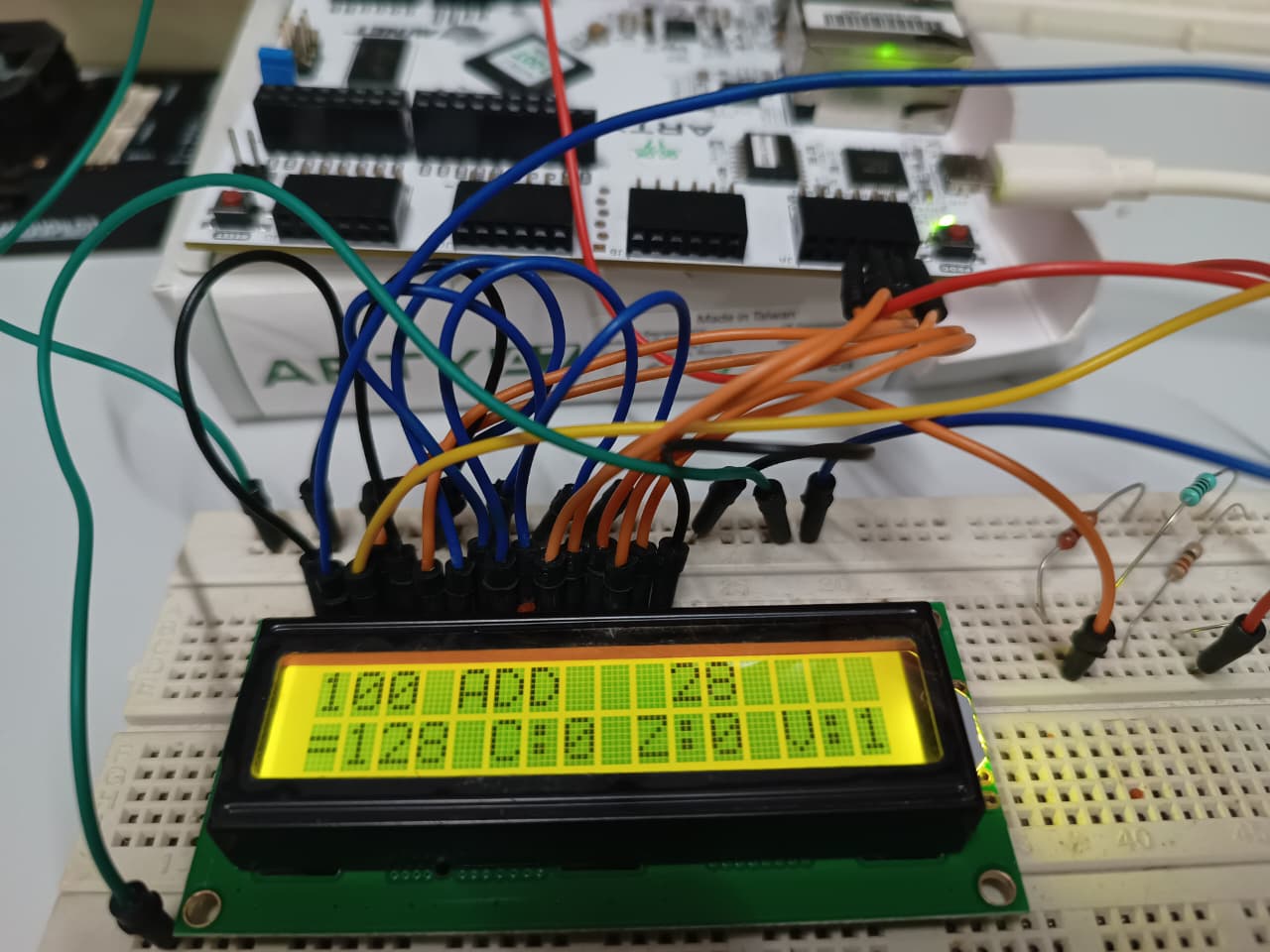
Combining them was the easy part once both pieces were independently solid: three onboard switches select the ALU operation in real time, and the result, along with carry/zero/overflow flags, displays live on the 16x2 LCD.
One honest disclosure: the two operands — A=100 and B=28 — are hardcoded constants in this version, not driven by switches or any other dynamic input. The point of this build was never to make a fully interactive calculator. The point was singular: prove that an FPGA-computed ALU result can be correctly displayed on a real LCD, end to end, which is the exact step that broke the original project. That proof point is now done.
Part 4 — How It Was Actually Built
This section is the methodology — what the original project lacked. Two independent modules, verified separately, then combined.
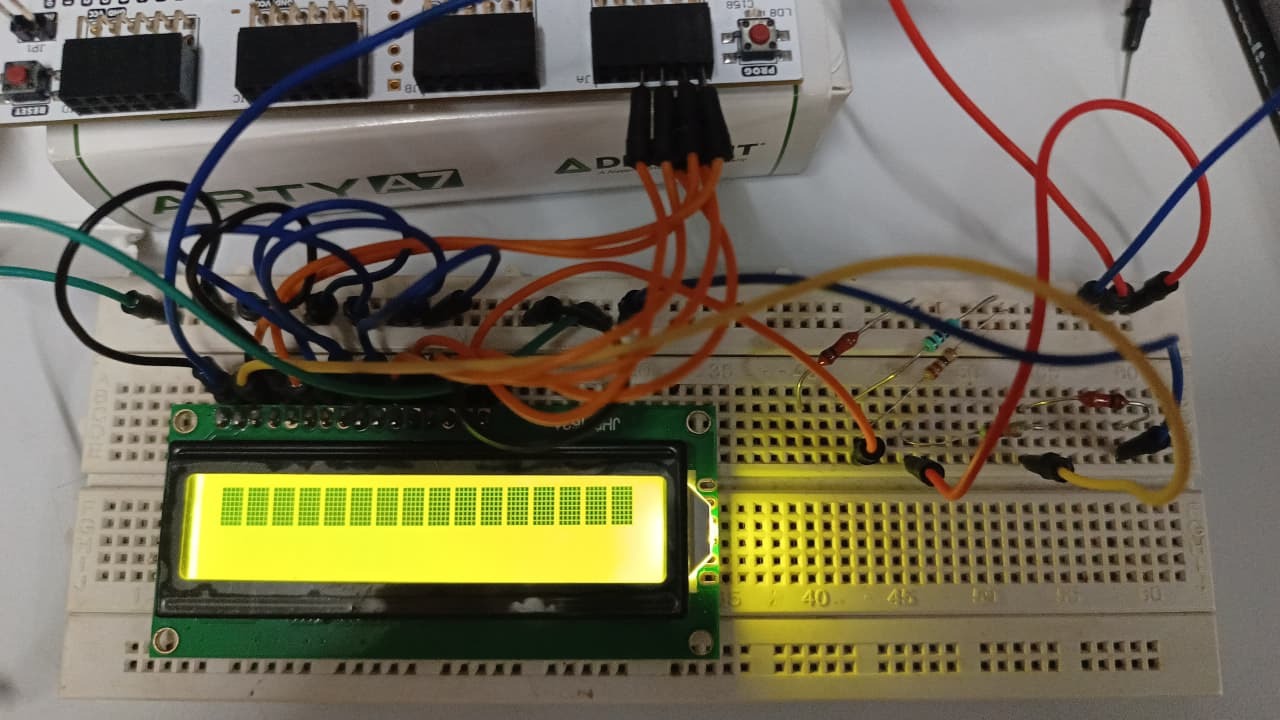
Hardware Setup
Board: Digilent Arty A7-100T
LCD: HD44780-based 16x2 green parallel LCD, no I2C backpack
Interface: 4-bit parallel mode via the JA Pmod header
LCD runs on 5V; the Arty’s I/O is 3.3V. The HD44780’s logic-high threshold is comfortably below 3.3V so the data lines work fine — but LCD VDD must come from the Arty’s 5V power header, not the 3.3V Pmod rail.
Contrast is set with a simple resistor divider (no potentiometer needed) — 10KΩ from 5V to the V0 pin, 1KΩ from V0 to GND, giving roughly 0.45V, which sits comfortably in the HD44780’s contrast range.
Wiring table:
| LCD Pin | Name | Connects To |
|---|---|---|
| 1 | VSS | GND |
| 2 | VDD | 5V (Arty power header) |
| 3 | V0 | Resistor divider midpoint |
| 4 | RS | JA Pin 1 |
| 5 | RW | GND (write-only, never read) |
| 6 | E | JA Pin 2 |
| 7–10 | D0–D3 | GND (unused in 4-bit mode) |
| 11 | D4 | JA Pin 3 |
| 12 | D5 | JA Pin 4 |
| 13 | D6 | JA Pin 7 |
| 14 | D7 | JA Pin 8 |
| 15 | LED+ | 5V via 100Ω resistor |
| 16 | LED- | GND |
The ALU Module
Purely combinational — no clock involved. One case statement on a 3-bit opcode driving an 8-bit result plus three flags.
module alu (
    input  logic [7:0] a,
    input  logic [7:0] b,
    input  logic [2:0] op,
    output logic [7:0] result,
    output logic       carry,
    output logic       zero,
    output logic       overflow
);
    logic [8:0] temp;

    always_comb begin
        temp     = 9'b0;
        carry    = 1'b0;
        overflow = 1'b0;
        result   = 8'b0;

        case (op)
            3'b000: begin // ADD
                temp     = {1'b0, a} + {1'b0, b};
                result   = temp[7:0];
                carry    = temp[8];
                overflow = (~a[7] & ~b[7] &  result[7]) |
                           ( a[7] &  b[7] & ~result[7]);
            end
            3'b001: begin // SUB
                temp     = {1'b0, a} - {1'b0, b};
                result   = temp[7:0];
                carry    = temp[8];
                overflow = ( a[7] & ~b[7] & ~result[7]) |
                           (~a[7] &  b[7] &  result[7]);
            end
            3'b010: result = a & b;
            3'b011: result = a | b;
            3'b100: result = a ^ b;
            3'b101: result = ~a;
            3'b110: begin result = a << 1; carry = a[7]; end
            3'b111: begin result = a >> 1; carry = a[0]; end
            default: result = 8'b0;
        endcase

        zero = (result == 8'b0);
    end
endmodule
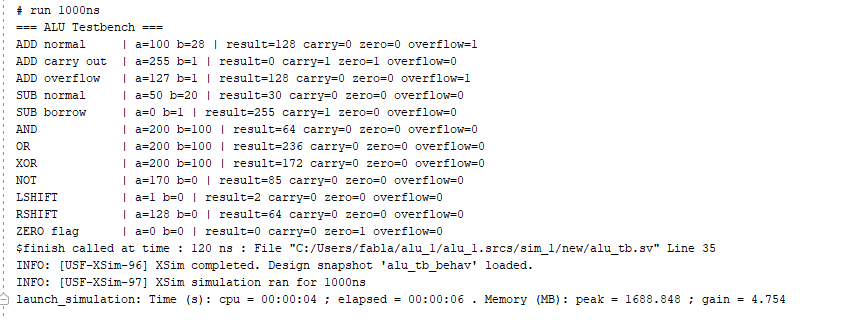
The overflow logic is the part most people get wrong. For ADD, signed overflow only occurs when both operands have the same sign but the result flips to the opposite sign — two positives summing to something that reads as negative in two’s complement, or vice versa. That’s exactly the 100 + 28 = 128 case below: two positive 8-bit values whose sum sets the sign bit.
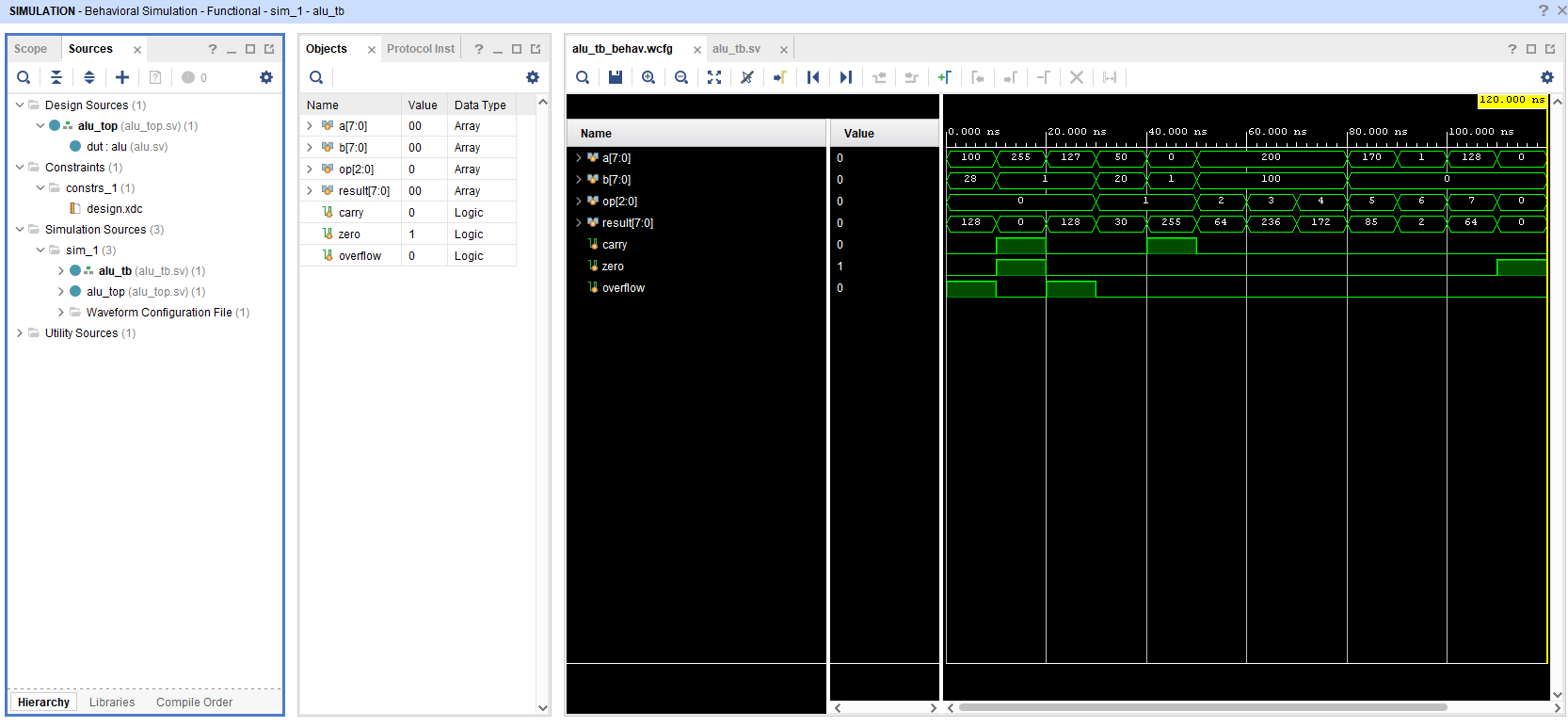
This module was simulated against all 8 operations — including edge cases like 255+1 (carry out), 127+1 (overflow), and 0-1 (borrow) — before it ever touched hardware. That simulation-first habit is the one thing missing entirely from the Sem 5 attempt.
The LCD Controller — Why It’s Not Trivial
On a microcontroller, lcd.print("Hello") hides everything. On an FPGA there’s no library — every step of the HD44780 protocol has to be built as an explicit state machine.
The initialization sequence (9 steps, each with specific timing):
- Wait >40ms after power-on
- Send
0x3in 8-bit mode, wait 4.1ms - Send
0x3again, wait 150µs - Send
0x3again, wait 150µs - Send
0x2— switch to 4-bit mode - Function Set (
0x28): 2 lines, 5×8 font, 4-bit interface - Display On (
0x0C) - Clear Display (
0x01), wait 1.52ms — the slowest command - Entry Mode (
0x06): auto-increment cursor
Miss any step or any timing value and the display either shows garbage or nothing at all — there’s no error message, just silence.
Every character or command is sent as two 4-bit nibbles, each framed by an Enable pulse:
1. Set RS (0 = command, 1 = data)
2. Put high nibble on D4–D7
3. Pulse E high → wait → E low
4. Put low nibble on D4–D7
5. Pulse E high → wait → E low
6. Wait execution time (50µs typical, 2ms for Clear)
The clock divider brings the 100MHz system clock down to a 1µs tick, and all the above timing is just counting ticks.
Core of the controller FSM (abbreviated — full version is ~300 lines):
typedef enum logic [5:0] {
    S_IDLE, S_INIT1, S_INIT2, S_INIT3, S_INIT4,
    S_CMD_HI, S_CMD_HI_HOLD, S_CMD_HI_LOW, S_CMD_LO_HOLD, S_CMD_WAIT,
    S_CHR_HI, S_CHR_HI_HOLD, S_CHR_HI_LOW, S_CHR_LO_HOLD, S_CHR_WAIT,
    S_NEXT_CHAR, S_DONE
} state_t;

// Generic 4-bit byte sender, reused for both commands and characters:
S_CMD_HI: begin
    lcd_e <= 0; delay_top <= 50;
    if (delay_done) begin
        lcd_rs <= 0;                       // 0 = command
        lcd_d  <= cmd_byte[7:4]; lcd_e <= 1; // high nibble first
        delay_top <= 1; state <= S_CMD_HI_HOLD;
    end
end
// ... low nibble follows the same pattern, then waits execution time
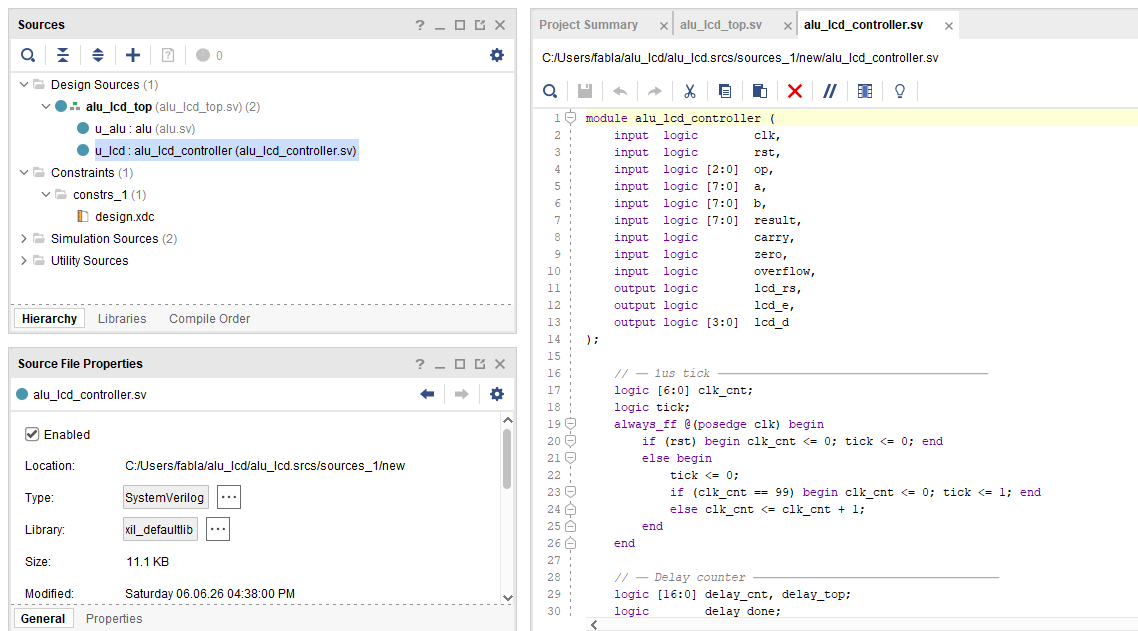
The key design decision: one generic byte-sender state sequence handles every command and every character — cmd_byte (for the init/control sequence) and char_buf[] (for the message text) just feed different data through the same nibble-pump logic.
Combining ALU + LCD
The two modules are wired together in a top-level file. Three onboard switches drive op[2:0] straight into the ALU; the ALU’s outputs feed a small message-builder that converts the result into ASCII for the LCD line buffers.
localparam [7:0] A = 8'd100;
localparam [7:0] B = 8'd28;

alu u_alu (
    .a (A), .b (B), .op (sw[2:0]),
    .result (result), .carry (carry),
    .zero (zero), .overflow (overflow)
);

alu_lcd_controller u_lcd (
    .clk(clk), .rst(btn[0]),
    .op(sw[2:0]), .a(A), .b(B),
    .result(result), .carry(carry), .zero(zero), .overflow(overflow),
    .lcd_rs(lcd_rs), .lcd_e(lcd_e), .lcd_d(lcd_d)
);
A BCD conversion function turns the 8-bit binary result into three decimal digits for display, and a small op-name lookup converts the 3-bit opcode into a readable label (ADD, SUB, AND, etc.) for line 1. An op-change detector watches the switches — any time they flip, the controller clears the LCD and redraws with the new operation, operands, result, and flags.
This is the exact integration step that consumed weeks and ultimately sank the original project. Here, because both halves (ALU and LCD driver) were already independently verified, wiring them together took an afternoon.
Part 5 — The Result
Flipping switches changes the operation in real time. The LCD refreshes immediately showing the new operation, operands, result, and flags.
ADD (100 + 28 = 128):
Line 1:  100 ADD  28
Line 2:  =128 C:0 Z:0 V:1
Overflow flag is correctly set here — two positive 8-bit numbers (100 and 28) summing to 128 flips the sign bit in two’s complement, which is a textbook signed-overflow case.
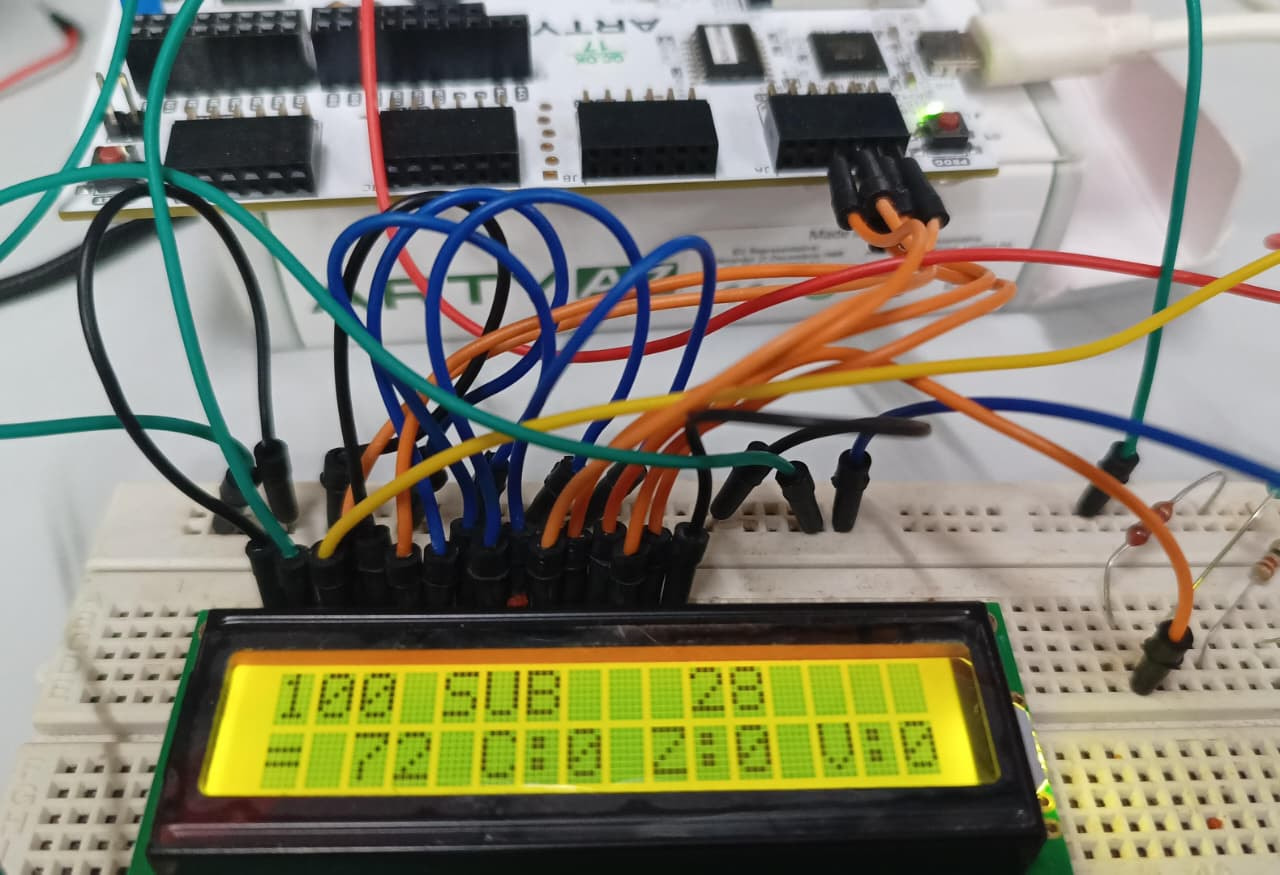
SUB (100 − 28 = 72):
Line 1:  100 SUB  28
Line 2:  = 72 C:0 Z:0 V:0
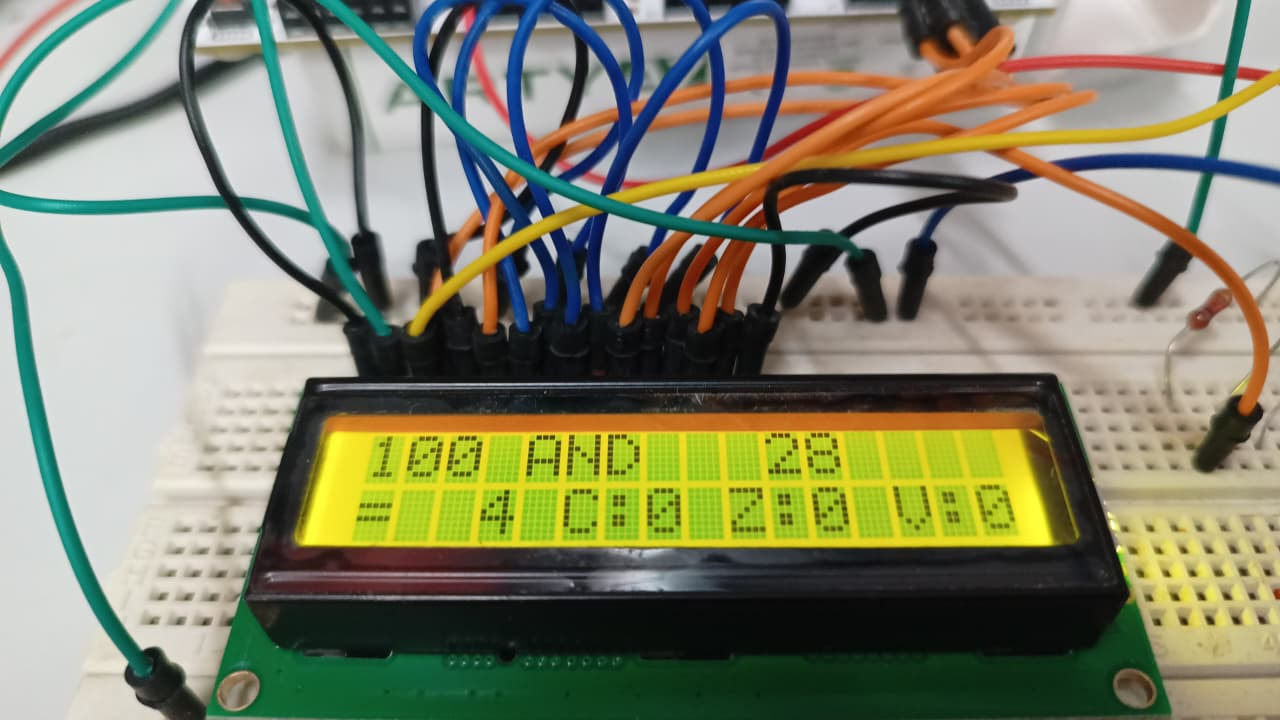
AND (100 & 28 = 64):
Line 1:  100 AND  28
Line 2:  = 64 C:0 Z:0 V:0
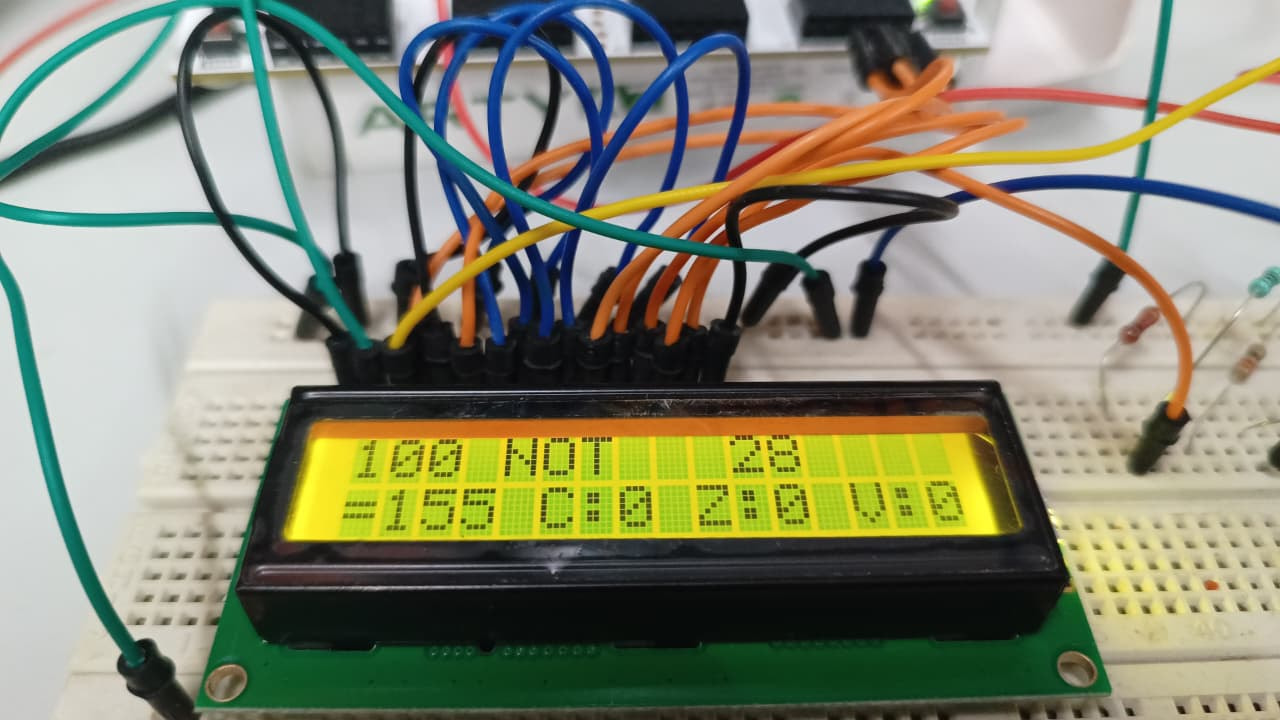
NOT (~100 = 155):
Line 1:  100 NOT  28
Line 2:  =155 C:0 Z:0 V:0
(The remaining four operations — OR, XOR, left shift, right shift — all verified working the same way; not included here to keep this post focused.)
Part 6 — What Actually Changed Between Then and Now
It’s worth being specific about why this worked this time when it didn’t five years ago — not as a victory lap, but as a genuine list of what was different:
1. Simulation discipline. Every module — the ALU, the LCD controller — was simulated and verified with a testbench before ever being flashed to hardware. In the original project, simulation access was disconnected from hardware access entirely (different machines, different OS), so there was no real iterative loop between the two.
2. Tooling that actually worked. Vivado on a properly supported OS, with onboard JTAG on the Arty board, meant the simulate → flash → test cycle took minutes, not a special trip to a lab with limited hours.
3. Sequencing. This time, the LCD driver was built and proven as its own standalone project first — completely separate from the ALU — before the two were ever combined. The original project’s core mistake was attempting the harder integration (LCD) before the simpler baseline (LED) was even working. This time, harder things were built and verified in isolation, then combined last.
4. No deadline, no committee. There’s something to be said for redoing a project with no external deadline and no need to defend design decisions to anyone. It removes the pressure that caused rushed, unverified choices the first time around.
5. Available knowledge. Searchable documentation, community forums, and AI-assisted debugging exist now in a way they didn’t five years ago. The original project leaned on scattered YouTube videos. This one had immediate access to datasheets, timing references, and a much faster debug loop.
Closing Thought
This wasn’t a hard project. An 8-bit ALU and an LCD display are both standard FPGA learning exercises — the kind you’d find in any intro course. That’s exactly why it bothered me that it failed the first time. Sometimes the value of redoing something isn’t the technical difficulty of the rebuild — it’s just finishing what you started, properly, once you actually have the tools and the time to do it right.
If you have an old “failed” project sitting somewhere in the back of your mind — this is your sign to go pull it back out.
Technical Reference
| Parameter | Original (Sem 5) | Rebuild (Present) |
|---|---|---|
| Board | Numato Spartan-6 | Digilent Arty A7-100T |
| Tool | Xilinx ISE | Vivado 2025.2 |
| HDL | (basic Verilog) | SystemVerilog |
| OS support | Windows 11 unsupported | Fully supported |
| Hardware access | Lab hours only, Linux-only sim | Full local dev, JTAG onboard |
| Output | LEDs (never worked) → 4-bit fallback (failed) | 16x2 LCD (working) |
| Result | Marks lost, incomplete | Functionally complete, proof-of-concept |
This post is part of an ongoing FPGA learning series on IoTSec. If you’ve ever gone back to finish an old failed project years later, share it in the replies — these stories matter as much as the working demos.