| # | Title | Status |
|---|---|---|
| Part 1 | What Is Ghidra and Why Should I Care? |  Read |
| Part 2 | Installing Ghidra - Java, Download, First Launch | Read |
| Part 3 | The CodeBrowser - Every Window Explained | Read |
| Part 4 | Importing Your First Binary | Read |
| Part 5 | Finding Your Way Around - Strings, XREFs, Navigation | Read |
| Part 6 | Real IoT Firmware - Download, Extract, Load Into Ghidra | Read |
| Part 7 | Projects, Saving, and What Actually Happens to Your Work | Read |
| Part 8 | x86 Registers and the CPU Model | Read |
| Part 9 | The Stack - How Functions Use Memory | Read |
| Part 10 | Reading Instructions - The 20 You Will See Everywhere | Read |
| Part 11 | The Decompiler - Power and Lies | Read |
| Part 12 | Data Types, Structures, and Making the Decompiler Readable | Read |
| Part 12.5 | Renaming and Retyping - Turning Guesses Into Real Code | Read |
| Part 13 | Control Flow - Conditions, Loops, and the Function Graph | Read |
| Part 14 | Retyping Variables - When Ghidra Gets the Type Wrong | Read |
| Part 15 | Cross-References - Following Data and Code Relationships | Read |
| Part 16 | Patching Binaries - Modify, Export, Run | Read |
| Part 17 | Calling Conventions - How Arguments and Return Values Actually Work | ← you are here |
You just patched a binary in Part 16. You found the JNZ at 00101493, understood what it controlled, and changed one byte to make it harmless.
You did that by reading assembly. By understanding what CMP and JNZ do at the byte level.
There is one piece of that picture you have been using without fully seeing. Every time main calls check_credentials, two values go in and one comes back. Those values travel through registers. The question is: which registers?
That is not arbitrary. There is a precise agreement that every function call on 64-bit Linux follows. It is called the calling convention, and once you know it, you can read any function call in any binary.
What Is a Calling Convention?
When one function calls another, the two functions need to agree on where to put the values being passed.
They cannot use the stack directly for every small thing - too slow, too much overhead. They cannot use global memory - that would not work for recursive calls or concurrent execution. The solution is registers - fast, local, right there in the CPU.
A calling convention is the agreement: argument 1 goes in this register, argument 2 goes in that register, the return value comes back in this other register. Both the caller and the function being called know the agreement. The compiler generates code that follows it.
You cannot choose a different convention for one function. If main puts argument 1 in RDX but check_credentials reads it from RDI, the values will not match. Everything breaks. The convention is mandatory.
The x86-64 Convention on Linux
The calling convention used on 64-bit Linux (and macOS) for C programs is called the System V AMD64 ABI. Here are the rules you will see constantly:
Arguments go into registers in this order:
| Argument | Register |
|---|---|
| 1st argument | RDI |
| 2nd argument | RSI |
| 3rd argument | RDX |
| 4th argument | RCX |
| 5th argument | R8 |
| 6th argument | R9 |
| 7th+ arguments | stack |
Return value comes back in RAX (or EAX for 32-bit values).
That is the whole thing. If a function takes 2 arguments, the caller puts the first in RDI and the second in RSI before the CALL instruction. When the function returns, RAX holds whatever it returned.
Seeing It in the Binary
Navigate to main in Ghidra (press G, type main, Enter). Scroll to the area around address 0010146f - just before the call to check_credentials.
Here is what you will see:
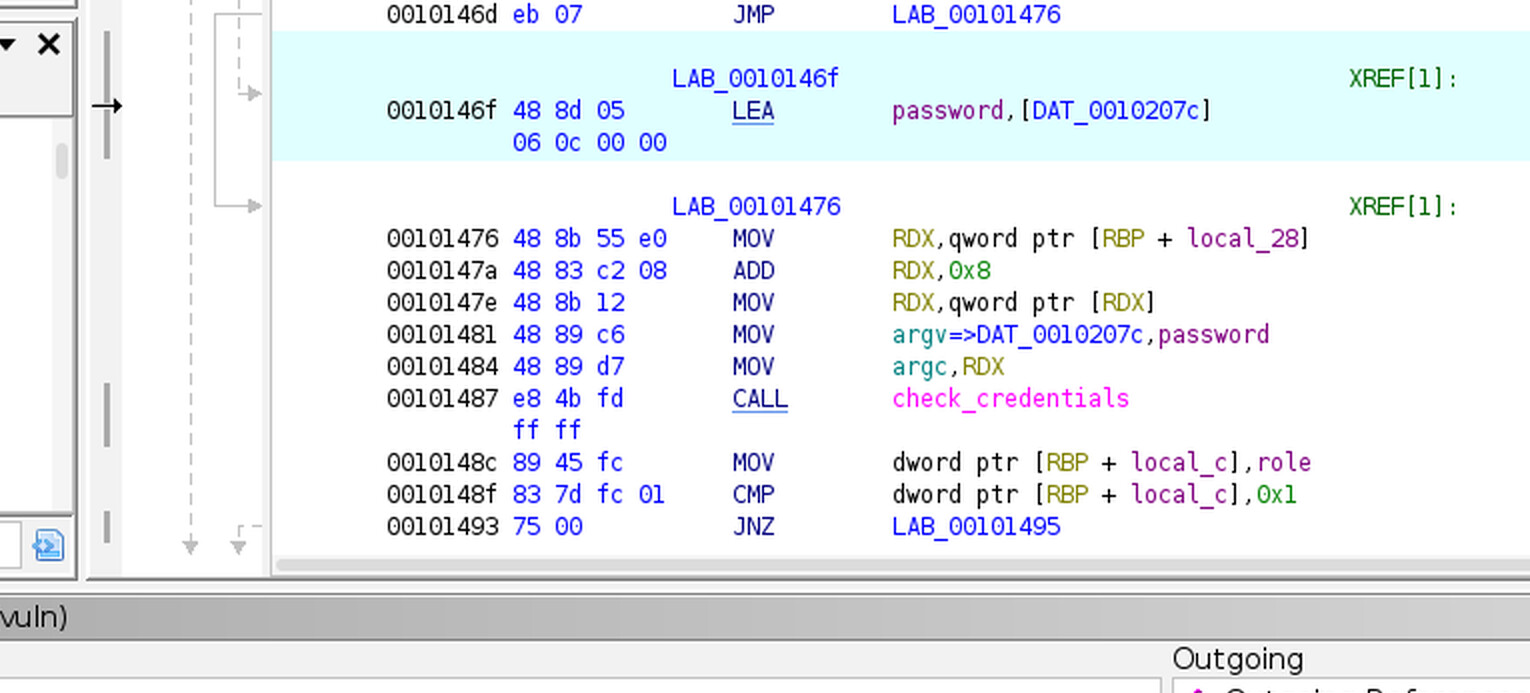
Let me walk through this sequence:
0010146f  LEA  password, [DAT_0010207c]   ; load address of "" into RAX
                                           ; (password = empty string when argc < 3)

00101476  MOV  RDX, qword ptr [RBP + local_28]  ; RDX = argv (the array)
0010147a  ADD  RDX, 0x8                          ; RDX = &argv[1] (pointer to 2nd slot)
0010147e  MOV  RDX, qword ptr [RDX]             ; RDX = argv[1] (dereference: the string)

00101481  MOV  RSI, RAX         ; RSI = password  (2nd argument → RSI)
00101484  MOV  RDI, RDX         ; RDI = argv[1]   (1st argument → RDI)
00101487  CALL check_credentials
The last two MOV instructions before CALL are the calling convention in action.
RDI = argv[1] - the username string is now in the first argument register.
RSI = password - the password string is now in the second argument register.
Then CALL check_credentials.
Wait - Ghidra showed argc and argv=>DAT_0010207c in those MOV lines, not RDI and RSI. Why?
Ghidra tracks what values are in registers and annotates them with the variable names it already knows. In main, the first CPU argument was argc - which also arrived in RDI. When we renamed it, Ghidra remembered that RDI is associated with argc. The name travels with the register.
The important thing is: the bytes 48 89 d7 are always MOV RDI, RDX regardless of what Ghidra labels them. The actual CPU register being loaded is RDI. Ghidra’s annotation is trying to be helpful - but sometimes it shows the name it already knows for that register rather than what it means in this new context.
After CALL check_credentials, the return value arrives:
0010148c MOV dword ptr [RBP + local_c], role
This stores EAX (Ghidra shows it as role) to the stack. The return value from check_credentials - the integer role - came back in EAX and got saved to a local variable. That local variable is then compared to 0x1 to decide the admin path.
What the Function Header Tells You
Navigate to check_credentials (press G, type check_credentials, Enter).
Look at the function header area in the Listing panel - the section above the first ENDBR64 instruction with the asterisks:
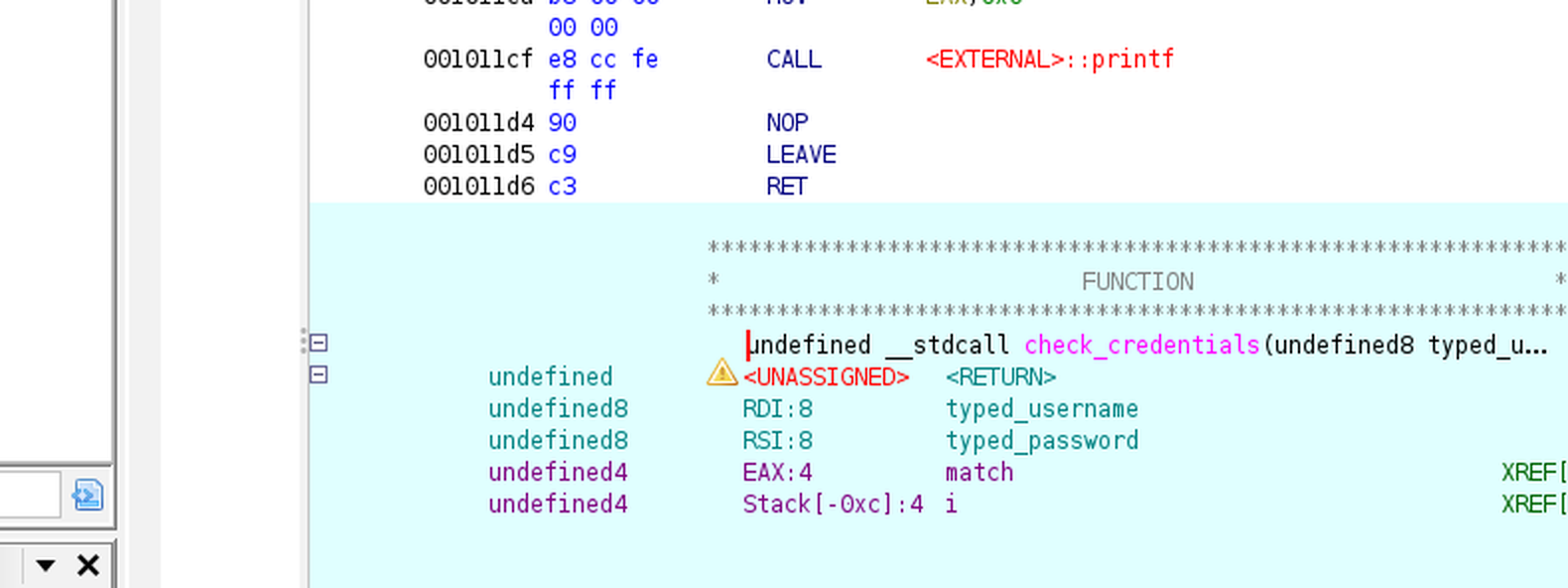
Ghidra makes the calling convention explicit in the function header. It says:
undefined8  RDI:8  typed_username
undefined8  RSI:8  typed_password
undefined4  EAX:4  match
RDI:8 typed_username means: the variable named typed_username lives in the RDI register and is 8 bytes wide.
RSI:8 typed_password means: the variable named typed_password lives in the RSI register and is 8 bytes wide.
EAX:4 match means: the variable named match lives in the EAX register and is 4 bytes. This is the return value register. When the function returns, whatever value is in EAX becomes the return value that the caller reads.
Ghidra figured this out from analysis. It saw that the function starts by saving RDI and RSI to the stack (the prologue), and that EAX is what the RET instruction carries back. So it annotated the function header to show these register-to-variable mappings.
The Decompiler Hides All of This
Switch to the Decompiler panel. Here is what check_credentials looks like:
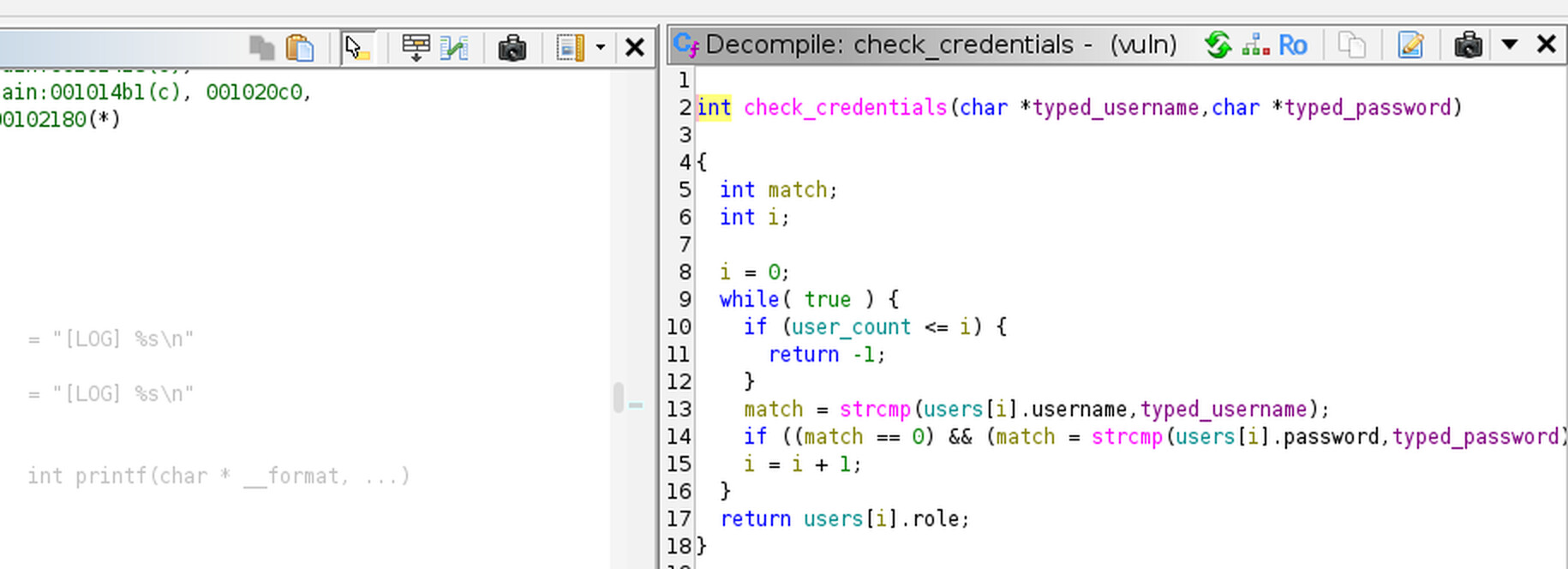
int check_credentials(char *typed_username, char *typed_password)
{
  int match;
  int i;

  i = 0;
  while (true) {
    if (user_count <= i) {
      return -1;
    }
    match = strcmp(users[i].username, typed_username);
    if ((match == 0) && (match = strcmp(users[i].password, typed_password, ...
    i = i + 1;
  }
  return users[i].role;
}
The decompiler translated:
RDI→typed_username(1st parameter,char *)RSI→typed_password(2nd parameter,char *)EAX→ the integer return value (int)
The function signature int check_credentials(char *typed_username, char *typed_password) is not stored anywhere in the binary. Ghidra reconstructed it from the calling convention. It saw what register main put first (RDI), what register it put second (RSI), what register check_credentials reads from (RDI → typed_username, RSI → typed_password), and what EAX holds at RET time.
The decompiler made the register dance invisible. What you see is clean C. What actually happened was MOV RDI, ... / MOV RSI, ... / CALL / read EAX.
How Return Values Work in Assembly
Navigate back to check_credentials and scroll to the end of the function. The return paths look like this:
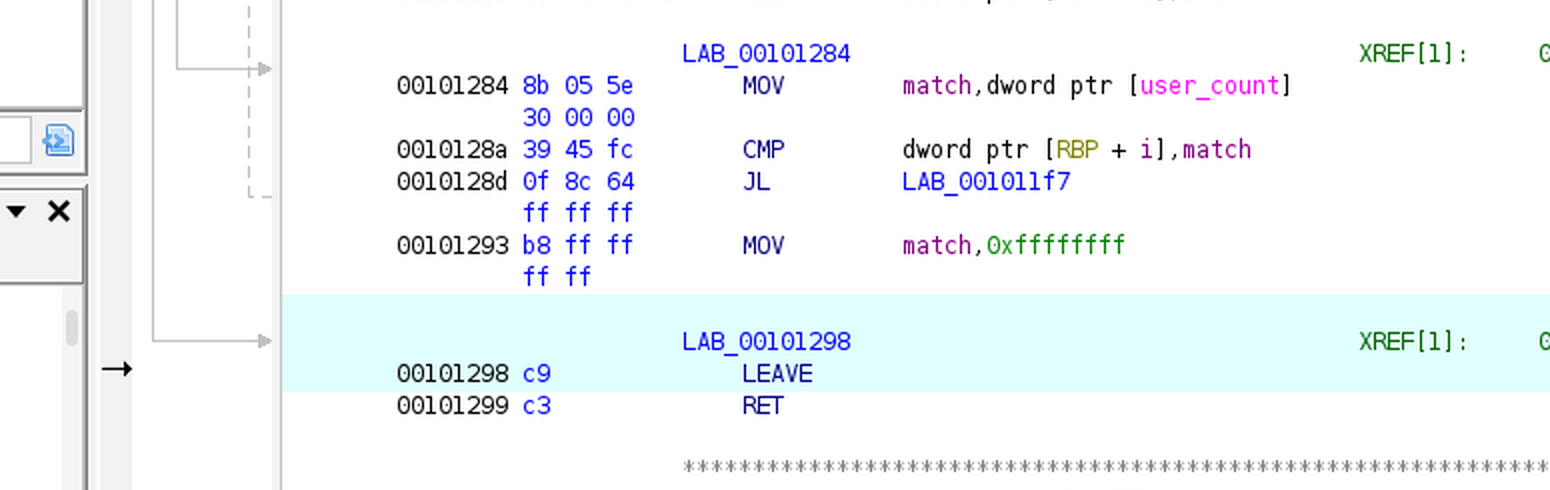
00101293  MOV  match, 0xffffffff   ; EAX = -1 (not found, return -1)

LAB_00101298:
00101298  LEAVE
00101299  RET
MOV match, 0xffffffff is Ghidra showing MOV EAX, -1. The variable match lives in EAX (as the function header told us). Loading 0xffffffff into EAX means loading the signed 32-bit value -1.
When RET executes, the caller reads EAX. That value - whatever was last loaded into EAX - becomes the return value.
The success path works the same way. When the loop finds a match:
0010127b  MOV  match=>users[0].role, dword ptr [RDX + match*0x1]
0010127e  JMP  LAB_00101298
The role value from users[i].role gets loaded into EAX (via match). Then it jumps to LAB_00101298 and executes LEAVE; RET. The caller reads EAX and gets the role integer.
One thing worth seeing: both return paths - the -1 path and the role path - merge at LAB_00101298 before RET. That is why there is only one RET instruction for the whole function. All paths that return a value put that value in EAX before jumping to the common exit point.
Reading a Function Call When Ghidra Doesn’t Know the Signature
Sometimes Ghidra fails to identify all the parameters of a function. It shows something like:
undefined check_credentials(undefined8 param_1, long param_2)
Now you know how to read it yourself. Look at the Listing panel in the caller, right before the CALL instruction:
MOV RDI, ...- the caller is loading the first argument. Whatever goes inRDIis parameter 1.MOV RSI, ...- whatever goes inRSIis parameter 2.MOV RDX, ...-RDXis parameter 3. And so on.
Then look at what happens after the CALL and how RAX or EAX is used. If the caller immediately moves EAX into a local variable, the function returns something meaningful.
This is how you recover signatures manually. You do not guess - you read the register loads.
Why This Matters for IoT Work
x86-64 Linux uses: RDI, RSI, RDX, RCX, R8, R9 for arguments, RAX for return.
ARM Linux (which runs most IoT devices - routers, cameras, embedded controllers) uses: R0, R1, R2, R3 for arguments, R0 for return.
MIPS (which runs many older routers and some firmware targets) uses: $a0, $a1, $a2, $a3 for arguments, $v0 for return.
The calling convention changes with the architecture. But the idea is always the same: there is a fixed agreement. Arguments go into specific registers before the call. Return value comes back in a specific register.
When you open your first ARM firmware in Ghidra (Part 18), the registers will have different names. But the same skill applies: find the MOV instructions before the CALL, check which ARM registers they use, and you can read any function call.
What You Actually Learned
You were already using calling conventions without naming them. Every time the decompiler showed you check_credentials(argv[1], password), it had already decoded the register loads, matched them to the convention, and reconstructed the clean C for you.
Now you know what that translation involved:
mainloadedRDIwithargv[1]andRSIwithpasswordmainexecutedCALL check_credentialscheck_credentialsread its parameters fromRDIandRSI(Ghidra named thesetyped_usernameandtyped_password)check_credentialsput the return value intoEAXbeforeRETmainreadEAXand stored it asrole
This is not an optional detail. When you read firmware where functions are unnamed and untyped, Ghidra’s decompiler cannot always figure out the signature. You will be reading raw register loads. Now you know what you are looking at.
What is Next
Next: Part 18 - ARM Architecture for Reverse Engineers: The Mental Model →